// // 3 comments

How To Hide Pages That You Have Liked On Facebook

There are some moments when you don't want to let your friends or family members know that you have liked a page on facebook. Maximum number of time people want to hide porn pages that they might afraid of anyone can see it. I am sure for boys. So do you want to learn how to hide pages that you have liked without letting your friends or family members know. So lets start today's tutorial.

Steps To Hide Facebook Likes From Timeline Profile

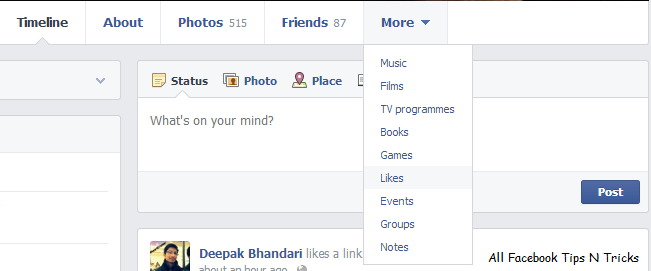
1. Go to your facebook Timeline , hover on More button then click on Likes.

Facebook Timeline

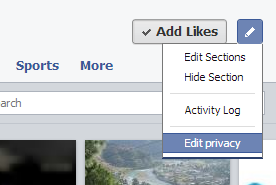
2. Click the Edit (pencil) icon on the upper right hand of the page. You can find it just beside the “Add Likes Button”.

Edit Privacy Option

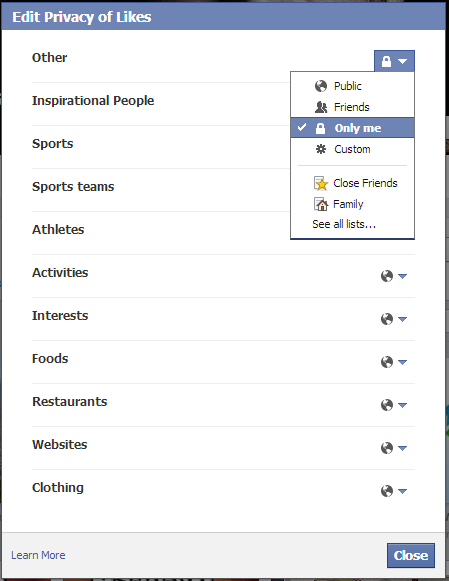
3. A pop up box will appear. Now Select which type of pages you want to hide by selecting Only Me option on the right.

Facebook Likes Privacy Popup

So this is the three step process to hide facebook pages that you have liked. Stay tuned for more stuff. Keep Sharing. :)
Read More
// // 22 comments

What Is fbcdn.net In Facebook URL ?

When you see open any image on Facebook it is opened in the same window. Right ? But when you open it in a new tab (Right Click -> Open Image In A New Tab) you will see fbcdn.net in your URL bar. So what is fbcdn.net ? Why facebook is using other domain name for their photos ? If you already know then read other tutorials and if you don't then read on...

 Whats The Matter Here ?

The photos which you upload to facebook, are actually being uploaded to fbcdn.net. Now the question arises, What is fbcdn.net and Why your photos are hosted on fbcdn.net ?

What Is fbcdn.net ?

Here facebook is actually using Akamai Technologies CND (Content Delivery Network). So this is your final answer if you know what is a CND and how it works. Others read on..

What is a CDN ?

According to Wikipedia - 
"A content delivery network or content distribution network (CDN) is a large distributed system of servers deployed in multiple data centers across the Internet. The goal of a CDN is to serve content to end-users with high availability and high performance".
So simply a CDN (content delivery network) will receive your data and place it on several different servers all over the world. This makes that particular content to load faster for anyone who wants to access it. This is because the content will be delivered to the end user from the nearest possible server holding the content.

Why Facebook Photos Are Uploaded To fbcdn.net ?

Akamai has several CDN networks, where fbcdn.net is one of the CDN. Facebook is a large network and it has to deliver content at much faster speeds to each and every user. And to do so, it requires a CDN.

Facebook uses fbcdn.net as CDN. This is why your photos are uploaded to fbcdn and not to facebook. So whenever you request to view a photo on facebook, your request is actually sent to the nearest possible Akamai server. This server returns the requested photo. And since its the nearest possible server, you will get the requested photo with a minimum time delay.
Facebook is also using Akamaihd.net and may be some other URL also.
Read More
// // 3 comments

How To Add All Facebook Friends In A Group At Once

Earlier I shared How To Invite All Facebook Friends To A Facebook Fan Page At Once . Today I am sharing How To Add All Friends In A Group At Once . Again this trick is based on Google Chrome extension. So it is quite simple as well. This will work only on Google Chrome browsers.

Steps To Follow


1. Add this Chrome extension from here .
2. Open the facebook group you want to invite friends for.
3. Just click on the extension on the top right corner.
4. Wait for some time and all of your friends will be added automatically.

Thats all. So by using this simple trick you can add all your facebook friends to a group easily. Suggestions are always welcomed.
Read More
// // 1 comment

How To Invite All Facebook Friends To A Facebook Fan Page At Once

In this tutorial I will be showing you how to invite all your facebook friends to your fan page at once. We will be using Imacros Extension and a sort of script for this. If you don't know what is Imacros and how to use it then read on...
"IMacros is an browser extension for the Mozilla Firefox, Google Chrome and Internet Explorer web browsers which adds record and replay."

Steps To Follow


1. First of all download Imacros for Google Chrome or Mozilla Firefox.
2. Download this Imacros script from here.
3. Paste this script in C:\Users\PCNAME\Documents\iMacros\Macros
4. Open your Facebook Fan Page.
5. Click on Invite Friends. A dialogue box will appear.
6. In the left select the script you want to use.
7. Then click on Play.


8. Wait for some time. It will select all your facebook friends.
9. Click On Submit.
10. Repeat the process again.

Thats all. Stay Tuned.
Read More