
Youtube officially doesn't provide RSS feed for youtube channels because they want you to start and stop on Youtube only. So, in this tutorial I will show you Two Working Methods of How To Get Youtube Channel RSS Feed URL.
![[Working] How To Get Youtube Channel RSS Feed URL](https://blogger.googleusercontent.com/img/b/R29vZ2xl/AVvXsEjuMmlq0VMCaB3av0_l9_sxWkiH5rl1Y4tV7pJr6XRS3sEteXc8WtYyA2LfavMLzbUCt2WQ108q8rpSWgjCvOUiv2BIKmyKL3L7AVb0btHOo38YN-TrjRCfqTAki6igGc37bZR-nZE3dGqE/s640/rss.jpg "[Working] How To Get Youtube Channel RSS Feed URL")
Method 1 - If The Channel Has A User Name
![[Working] How To Get Youtube Channel RSS Feed URL](https://blogger.googleusercontent.com/img/b/R29vZ2xl/AVvXsEg5qcwsz9mbqzGG472hdtpiaBowtI6CAewroBLnZwRKakYRROlJamis52l-1w_3bR9V3eCU9ms129MOn6VfTzSNU2asm4sLCBnC5N4_XVnky7NPrYp0SMkp_qJv2yLaeIpmSe4IVTq9XPH9/s640/darrenrowse_youtube1.png "[Working] How To Get Youtube Channel RSS Feed URL")
- Go to the channel url you want the RSS feed for.
- Copy the user name in the URL bar.
- Paste the copied user name into the URL below.
Now you have the RSS Feed url of a youtube channel that you love, and/or want to share easily and automatically to your social media channels, using an rss syndication service like dlvr.it.
Method 2 : If The Channel Doesn't Have A User Name
- Go to the YouTube channel you want to track.
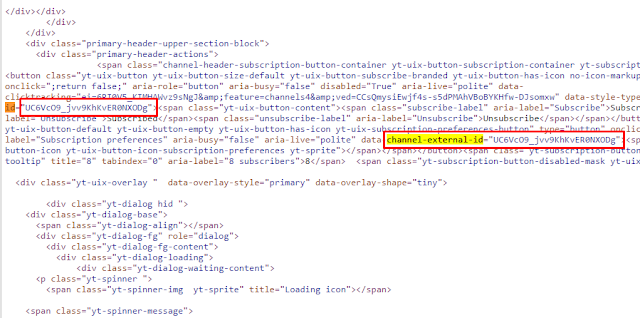
- View the page’s source code.
- Look for the following text:
channel-external-id - Get the value for that element (it’ll look something like UC6VcO9_jvv9KhKvER0NXODg
- Replace that value into this URL :
https://www.youtube.com/feeds/videos.xml?channel_id=UC6VcO9_jvv9KhKvER0NXODg
Now you can paste that into any RSS reader and you’ll be able to track when new content is posted.


